Web SDK Attribution & Session Tracking Guide
Overview
The Metrix Web SDK provides comprehensive attribution and session tracking capabilities:
- Attribution: Determine how users were acquired (campaign, organic, etc.)
- Session Tracking: Track user sessions, installs, and engagement
- User Identification: Generate and retrieve unique Metrix user IDs
- Deep Linking Support: Handle PWA (Progressive Web App) scenarios; TWA apps can use the native Android bridge described below
Quick Start
import { init, getAttributionStatus, onMetrixUserIdReceived } from '@metrixorg/websdk';

// Initialize with session tracking
init('APP_ID', 'API_KEY', {
  sessionTracking: {
    enabled: true,
    packageName: 'my-web-app',
  },
});

// Get Metrix user ID
const metrixUserId = await onMetrixUserIdReceived();
console.log('Metrix User ID:', metrixUserId);

// Check attribution status
const attribution = await getAttributionStatus();
console.log('Attribution:', attribution);
Part 1: Attribution Status
Overview
Attribution determines how a user was acquired. The SDK provides methods to check the current user’s attribution status, which helps you understand the effectiveness of your marketing campaigns.
Getting Attribution Status
Use getAttributionStatus() to retrieve detailed attribution information:
import { getAttributionStatus, onMetrixUserIdReceived } from '@metrixorg/websdk';

// Wait for Metrix user ID to be available
await onMetrixUserIdReceived();

// Get attribution information
const attribution = await getAttributionStatus();

if (attribution) {
  console.log('Attribution Status:', attribution.attributionStatus);
  console.log('Source:', attribution.acquisitionSource);
  console.log('Campaign:', attribution.acquisitionCampaign);
}
Method Signature
getAttributionStatus(): Promise<AttributionStatus | null>Returns:
AttributionStatusobject with complete attribution datanullif SDK is not initialized or Metrix user ID is not available
Automatic Retry Logic
When the server returns NOT_ATTRIBUTED_YET, the SDK automatically:
- Waits 10 seconds
- Retries the request
- Repeats until a final status is received
This ensures you always get the complete attribution information.
AttributionStatus Object
interface AttributionStatus {
  acquisitionAd: string; // Ad identifier
  acquisitionAdSet: string; // Ad set identifier
  acquisitionCampaign: string; // Campaign name
  acquisitionSource: string; // Source (e.g., 'Google', 'Facebook')
  acquisitionSubId: string; // Additional tracking sub ID
  acquisitionAdNetwork: string; // Ad network (e.g., 'Google Ads')
  attributionStatus: string; // Current status (see below)
  trackerToken: string; // Metrix tracker token
  installTime: number; // Installation timestamp (ms)
  reinstalled: boolean; // Whether user reinstalled
  installedByImpression: boolean; // Whether attributed to impression
}
Attribution Status Values
| Value | Description |
|---|---|
ATTRIBUTED | User has been successfully attributed to a campaign or acquisition source. User’s install is linked to a specific marketing campaign. |
NOT_ATTRIBUTED_YET | Attribution is still being processed. The SDK will automatically retry every 10 seconds. This is temporary state, usually resolves within 30-60 seconds. |
ATTRIBUTION_NOT_NEEDED | User is organic (no campaign attribution needed). User installed the app without clicking an ad or campaign link. |
UNKNOWN | Attribution status cannot be determined. The system could not verify the user’s attribution. |
Complete Example
import { init, getAttributionStatus, onMetrixUserIdReceived } from '@metrixorg/websdk';

// Initialize SDK
init('APP_ID', 'API_KEY', {
  sessionTracking: { enabled: true },
});

// Wait for Metrix ID
const metrixUserId = await onMetrixUserIdReceived();
console.log('Device ID:', metrixUserId);

// Get attribution with complete handling
try {
  const attribution = await getAttributionStatus();

  if (!attribution) {
    console.log('Attribution not available yet');
    return;
  }

  switch (attribution.attributionStatus) {
    case 'ATTRIBUTED':
      console.log('✓ Attributed user');
      console.log('  Campaign:', attribution.acquisitionCampaign);
      console.log('  Source:', attribution.acquisitionSource);
      console.log('  Network:', attribution.acquisitionAdNetwork);
      console.log('  Install Time:', new Date(attribution.installTime));
      break;

    case 'NOT_ATTRIBUTED_YET':
      console.log('○ Attribution still processing...');
      // SDK will retry automatically
      break;

    case 'ATTRIBUTION_NOT_NEEDED':
      console.log('Organic user - no campaign attribution');
      break;

    case 'UNKNOWN':
      console.log('? Attribution status unknown');
      break;
  }

  // Log for analytics
  analytics.logAttribution({
    status: attribution.attributionStatus,
    source: attribution.acquisitionSource,
    campaign: attribution.acquisitionCampaign,
  });
} catch (error) {
  console.error('Failed to get attribution:', error);
}
Use Cases
1. User Onboarding
const attribution = await getAttributionStatus();

if (attribution?.attributionStatus === 'ATTRIBUTED') {
  // Show campaign-specific welcome message
  showWelcomeMessage(attribution.acquisitionCampaign);
} else {
  // Show generic welcome
  showGenericWelcome();
}
2. Conversion Tracking
function trackPurchase(amount) {
  getAttributionStatus().then(attribution => {
    analytics.trackPurchase({
      amount,
      campaign: attribution?.acquisitionCampaign,
      source: attribution?.acquisitionSource,
    });
  });
}
3. Campaign ROI Analysis
async function calculateROI() {
  const attribution = await getAttributionStatus();

  if (attribution?.attributionStatus === 'ATTRIBUTED') {
    const roi = calculateReturn(attribution.acquisitionCampaign);
    updateDashboard(attribution.acquisitionCampaign, roi);
  }
}
4. Fraud Detection
const attribution = await getAttributionStatus();

if (attribution?.reinstalled) {
  console.log('Warning: User reinstalled app');
  // Apply additional fraud checks
}
Part 2: Session Tracking
Overview
Session tracking monitors user engagement with your web application:
- Install Counting: First session = installation
- Session Management: Track user activity periods
- Session Duration: Measure how long users stay active
- Inactivity Detection: Restart sessions after 30+ minutes of inactivity
- URL Tracking: Monitor which pages users visit
Enable Session Tracking
import { init } from '@metrixorg/websdk';

init('APP_ID', 'API_KEY', {
  sessionTracking: {
    enabled: true, // Required
    packageName: 'my-app', // Optional: identify your app
  },
});
Configuration
interface SessionTrackingConfig {
  enabled: boolean; // Enable/disable session tracking (required)
  packageName?: string; // App identifier for tracking (optional)
}| Field | Type | Required | Description | Default |
|---|---|---|---|---|
enabled | boolean | ✓ | Enable session tracking | N/A |
packageName | string | Custom app identifier | None |
How Sessions Work
Session Lifecycle
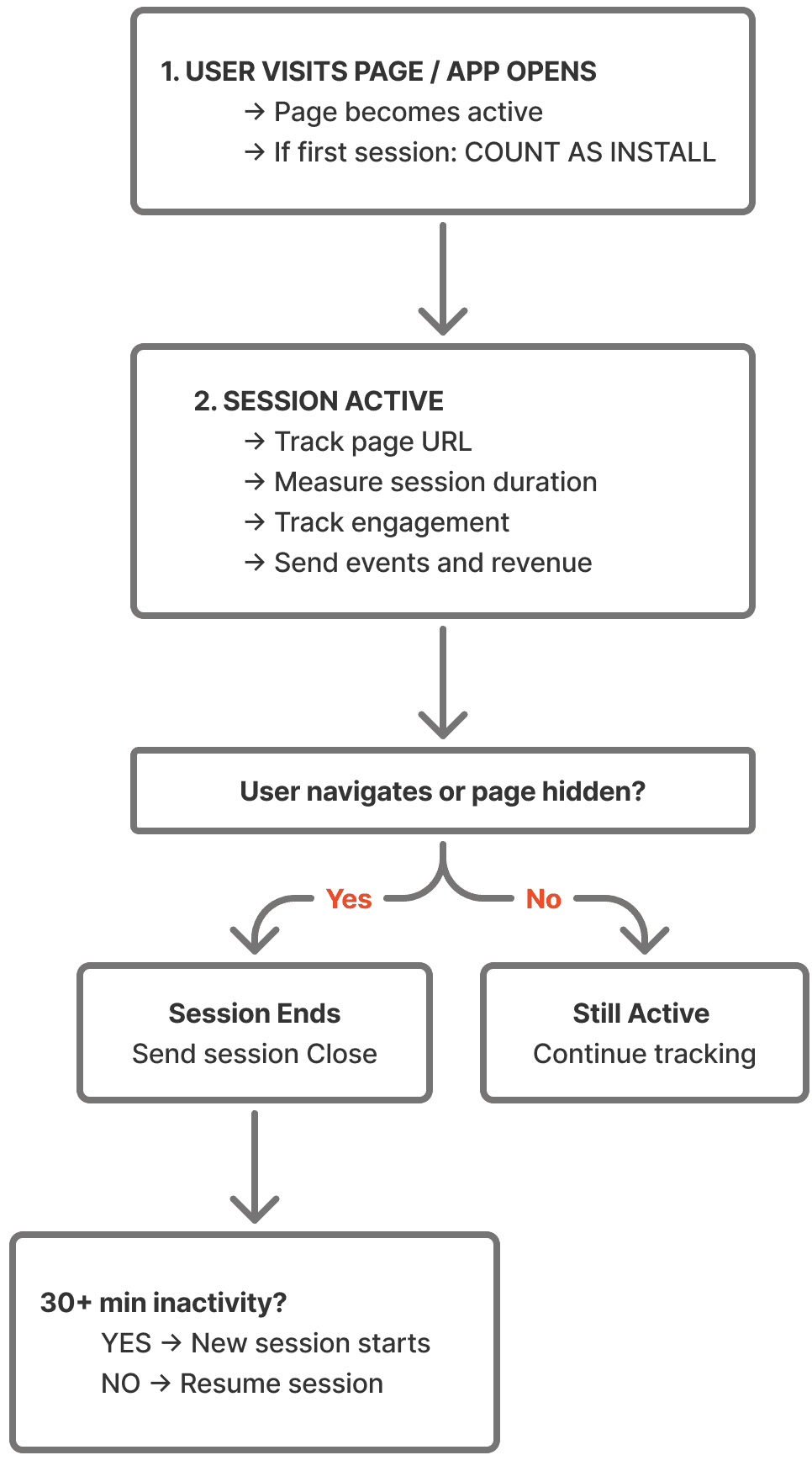
Session Activities Tracked
-
Page Load/Focus
- When page becomes active
- After 30+ minutes inactivity
-
Page Visibility
- Pauses when page hidden
- Resumes when visible
-
URL Changes
- Records each visited URL
- Tracks navigation pattern
-
Duration
- Total time active on page
- Time between actions
-
Inactivity
- 30 minute timeout threshold
- Auto-closes and reopens new session
Install Counting
Web Apps
The first user session is automatically counted as an installation:
init('APP_ID', 'API_KEY', {
  sessionTracking: {
    enabled: true,
  },
});

// First time user visits → Install counted
// Return visitors → Sessions tracked
PWA (Progressive Web App)
No special setup required. Enable session tracking and the first session = install:
init('APP_ID', 'API_KEY', {
  sessionTracking: {
    enabled: true,
    packageName: 'my-pwa', // Optional identifier
  },
});
The SDK counts installs without needing device identifiers because PWAs are installed per browser.
Part 3: TWA (Trusted Web Activity) Setup
Overview
The Android attribution SDK can connect the website in a TWA to native Metrix
attribution and analytics through Chrome’s postMessage channel. This requires
Chrome 115.0.5790.13 or newer and AndroidX Browser 1.6.0 or newer. A TWA cannot
use a WebView JavaScript interface.
This native bridge is separate from the Web SDK. The Web SDK still reads
gps_adid from the launch URL when sessionTracking.enabled is true, but passing
the advertising ID in the URL is not required for the native bridge. If the
website also uses the Web SDK for browser/PWA tracking, keep its initialization
for that purpose and avoid sending the same event through both SDKs.
Step 1: Configure the Android host
Add the attribution SDK and Browser to your app. Include analytics if website
code will send analytics commands through the bridge. The Android TWA sample uses
Metrix version 2.8.6; use a version that includes MetrixAttributionTwaBridge.
dependencies {
  implementation("androidx.browser:browser:1.6.0")
  implementation("ir.metrix.attribution:metrix:2.8.6")
  implementation("ir.metrix.analytics:metrix:2.8.6")
}
Configure the native SDK with ir.metrix.APPLICATION_ID and ir.metrix.API_KEY
in the application’s manifest, as in the Android integration guide. Keep the SDK
signature in native configuration when possible. Add the browser service inside
<application> and the query directly inside <manifest>:
<queries>
  <intent>
    <action android:name="android.support.customtabs.action.CustomTabsService" />
  </intent>
</queries>
<application>
  <service
    android:name="androidx.browser.customtabs.PostMessageService"
    android:exported="true" />
</application>
Step 2: Verify the website origin
Serve https://app.example/.well-known/assetlinks.json over HTTPS, replacing
the package name and fingerprint with those of the signed Android app:
[
  {
    "relation": [
      "delegate_permission/common.handle_all_urls",
      "delegate_permission/common.use_as_origin"
    ],
    "target": {
      "namespace": "android_app",
      "package_name": "com.example.twa",
      "sha256_cert_fingerprints": ["YOUR:APP:SIGNING:CERTIFICATE:SHA256:FINGERPRINT"]
    }
  }
]
handle_all_urls establishes the TWA relationship and use_as_origin permits
the message channel. For Google Play App Signing, use the app signing certificate
fingerprint; add a development certificate fingerprint if testing debug builds.
The bridge origin must match the website’s HTTPS origin exactly, without a path.
Step 3: Launch with the bridged browser session
Create a MetrixAttributionTwaBridge on the main thread, pass it to
newSession, attach that session, then launch the TWA with the same session:
private var bridge: MetrixAttributionTwaBridge? = null
private var browserBound = false

private val browserConnection = object : CustomTabsServiceConnection() {
  override fun onCustomTabsServiceConnected(name: ComponentName, client: CustomTabsClient) {
    client.warmup(0L)
    val currentBridge = bridge ?: return
    val session = client.newSession(currentBridge) ?: run {
      currentBridge.disconnect()
      launchFallback()
      return
    }
    currentBridge.attach(session)
    TrustedWebActivityIntentBuilder(Uri.parse("https://app.example"))
      .build(session)
      .launchTrustedWebActivity(this@MainActivity)
  }

  override fun onServiceDisconnected(name: ComponentName) {
    bridge?.disconnect()
  }
}

private fun launchTwa() {
  bridge = MetrixAttributionTwaBridge(
    origin = "https://app.example",
    stateListener = MetrixAttributionTwaBridge.StateListener { state, error ->
      // Log READY or UNAVAILABLE, with its error, during device testing.
      Log.d("MetrixTwa", "Bridge: $state; error: $error")
    }
  )
  val provider = CustomTabsClient.getPackageName(this, null)
  browserBound = provider != null &&
    CustomTabsClient.bindCustomTabsService(this, provider, browserConnection)
  if (!browserBound) {
    bridge?.disconnect()
    launchFallback()
  }
}

private fun launchFallback() {
  CustomTabsIntent.Builder().build().launchUrl(this, Uri.parse("https://app.example"))
  finish()
}

override fun onDestroy() {
  bridge?.close()
  if (browserBound) unbindService(browserConnection)
  super.onDestroy()
}
This example belongs in an AppCompatActivity and needs imports for
ComponentName, Uri, Log, CustomTabsClient, CustomTabsIntent,
CustomTabsServiceConnection, TrustedWebActivityIntentBuilder, and
MetrixAttributionTwaBridge. Call
launchTwa() from onCreate. If Bubblewrap or Android Browser Helper owns the
session callback, forward its relationship validation, navigation, channel-ready,
and message callbacks to the bridge. Create a new bridge for each browser session.
Step 4: Connect from the website
Copy metrix_attribution_twa.js from the Android SDK’s
attribution/src/main/assets/ directory to your website, and load it before
asynchronous application startup. A TWA loads the hosted HTTPS copy; updating
the Android dependency alone does not update that script.
<script src="/metrix_attribution_twa.js"></script>
<script>
  const nativeMetrix = MetrixAttributionTwa.create({ origin: window.location.origin });

  nativeMetrix.ready.then(async () => {
    await nativeMetrix.setUserIdListener(userId => console.log('Native user ID:', userId));
    await nativeMetrix.setOnAttributionChangedListener(data => console.log('Native attribution:', data));
    await nativeMetrix.setOnDeeplinkResponseListener(url => {
      // Route the deferred deep link in the website.
      console.log('Deferred deep link:', url);
    }, false); // false prevents the native SDK from also launching the link.
    // Optional: await nativeMetrix.newEventByName('TWA open', { source: 'web' });
  }).catch(error => {
    // Normal browser visits and unsupported providers can continue without the bridge.
    console.log('Native Metrix unavailable:', error.message);
  });

  // Call nativeMetrix.teardown() when permanently disposing this page's client.
</script>
The bridge’s listener data comes from the native SDK. Web SDK
getAttributionStatus() and onMetrixUserIdReceived() describe the separate web
identity. Each full page navigation needs a new client and listener registration;
single-page routing can retain the client.
Verify the integration
On a signed test app with the deployed assetlinks.json, launch using Chrome
115+ and check that the native bridge reports READY and the website receives
the user ID and attribution callbacks. Reload the page and check that the new
document receives callbacks. If connection fails, check the exact origin,
package/fingerprint, use_as_origin relation, browser version, and that the
script loaded before the first native message. The website should still work
when the native channel is unavailable.
Part 4: Retrieving Metrix User ID
Overview
Metrix generates a unique user ID for each device. This ID is useful for:
- Server-to-server event tracking via API
- Cross-device tracking
- User analytics
- Debugging
Getting the Metrix User ID
import { onMetrixUserIdReceived } from '@metrixorg/websdk';

const metrixUserId = await onMetrixUserIdReceived();
console.log('Metrix User ID:', metrixUserId);
Method Signature
onMetrixUserIdReceived(): Promise<string>Returns: Unique Metrix user ID string
Timing
The Metrix user ID is generated shortly after SDK initialization. Use onMetrixUserIdReceived() to wait for it:
import { init, onMetrixUserIdReceived } from '@metrixorg/websdk';

// Initialize SDK
init('APP_ID', 'API_KEY', {
  sessionTracking: { enabled: true },
});

// Wait for ID (typically ready within 1-2 seconds)
try {
  const metrixUserId = await onMetrixUserIdReceived();
  console.log('Ready to use:', metrixUserId);
} catch (error) {
  console.error('Failed to get Metrix user ID:', error);
}
Server-to-Server Integration
Use the Metrix user ID for backend event tracking:
// Frontend: Get the ID
const metrixUserId = await onMetrixUserIdReceived();

// Send to backend
fetch('/api/user/setup', {
  method: 'POST',
  headers: { 'Content-Type': 'application/json' },
  body: JSON.stringify({ metrixUserId }),
});
# Backend: Use for server-to-server API calls
import requests
def send_event_to_metrix(metrix_user_id, event_name):
response = requests.post(
'https://api.metrix.ir/v1/events',
headers={'Authorization': 'Bearer YOUR_API_KEY'},
json={
'userId': metrix_user_id,
'eventName': event_name,
'timestamp': datetime.utcnow().isoformat(),
}
)
return response.json()Storing the ID
In most cases, you don’t need to store this ID. The SDK manages it automatically. Only store if you have specific backend requirements:
const metrixUserId = await onMetrixUserIdReceived();

// Store in database if needed
localStorage.setItem('metrix_user_id', metrixUserId);

// Or send to backend
analyticsAPI.setUserId(metrixUserId);
Complete Integration Example
import {
  init,
  authorizeUser,
  getAttributionStatus,
  onMetrixUserIdReceived,
  newEvent,
} from '@metrixorg/websdk';

// ==========================================
// 1. INITIALIZE SDK
// ==========================================
init('APP_ID', 'API_KEY', {
  sessionTracking: {
    enabled: true,
    packageName: 'my-web-app',
  },
});

// ==========================================
// 2. GET SYSTEM IDs
// ==========================================
const metrixUserId = await onMetrixUserIdReceived();
console.log('System User ID:', metrixUserId);

// ==========================================
// 3. CHECK ATTRIBUTION
// ==========================================
const attribution = await getAttributionStatus();
console.log('Attribution:', attribution?.attributionStatus);
console.log('Campaign:', attribution?.acquisitionCampaign);
console.log('Source:', attribution?.acquisitionSource);

// ==========================================
// 4. AUTHORIZE USER
// ==========================================
authorizeUser('customer@example.com');

// ==========================================
// 5. TRACK EVENTS WITH CONTEXT
// ==========================================
newEvent('app_opened', {
  attribution_status: attribution?.attributionStatus,
  campaign: attribution?.acquisitionCampaign,
});

// ==========================================
// 6. SEND TO ANALYTICS
// ==========================================
analytics.init({
  userId: metrixUserId,
  customerId: 'customer@example.com',
  campaign: attribution?.acquisitionCampaign,
});

// ==========================================
// 7. MONITOR SESSION
// ==========================================
document.addEventListener('visibilitychange', () => {
  if (document.hidden) {
    console.log('Session paused');
  } else {
    console.log('Session resumed');
  }
});
Best Practices
1. Initialize Early
// ✓ Good - Initialize immediately
import { init } from '@metrixorg/websdk';
init('APP_ID', 'API_KEY', { ... });

// ✗ Bad - Delayed initialization
setTimeout(() => init(...), 5000);
2. Wait for IDs
// ✓ Good - Wait for IDs to be ready
const id = await onMetrixUserIdReceived();
const attribution = await getAttributionStatus();

// ✗ Bad - Use immediately without waiting
console.log(metrixUserId); // May be undefined
3. Enable Session Tracking
// ✓ Good - Enable to count installs
init('APP_ID', 'API_KEY', {
  sessionTracking: { enabled: true },
});

// ✗ Bad - Disabled, installs not tracked
init('APP_ID', 'API_KEY', {
  sessionTracking: { enabled: false },
});
4. Handle Errors Gracefully
// ✓ Good
try {
  const attribution = await getAttributionStatus();
  // Use attribution
} catch (error) {
  console.error('Attribution unavailable:', error);
  // Graceful fallback
}

// ✗ Bad - Unhandled errors crash
const attribution = await getAttributionStatus();
console.log(attribution.acquisitionCampaign); // Crashes if null
5. TWA: Use the Native Message Channel
Load the hosted metrix_attribution_twa.js early and launch the TWA with the
same browser session that was attached to MetrixAttributionTwaBridge.
Troubleshooting
Attribution Not Available
Problem: getAttributionStatus() returns null
- Check: Is SDK initialized before calling?
- Check: Is Metrix user ID ready? Use
onMetrixUserIdReceived() - Check: Does app have valid API_KEY?
// Wait for ID first
await onMetrixUserIdReceived();
const attribution = await getAttributionStatus();
Metrix User ID Taking Too Long
Problem: onMetrixUserIdReceived() times out
- Solution: Add timeout handling
const idPromise = onMetrixUserIdReceived();
const timeoutPromise = new Promise((_, reject) => setTimeout(() => reject('Timeout'), 5000));

try {
  const metrixUserId = await Promise.race([idPromise, timeoutPromise]);
} catch {
  console.log('ID not available in time');
}
Sessions Not Starting
Problem: First session not counted as install
- Check: Is
sessionTracking.enabledset totrue? - Check: Is page loaded when SDK initializes?
- Solution: Initialize before page load
// Put in <head> or early in app
init('APP_ID', 'API_KEY', {
  sessionTracking: { enabled: true },
});
TWA Native Bridge Unavailable
Problem: The website cannot connect to the native SDK.
- Check: Does
assetlinks.jsoncontain both required relations and the signed app’s package and SHA-256 fingerprint? - Check: Does the bridge use the same HTTPS origin as the website, and was the script loaded early?
- Check: Is Chrome 115+ available, and was the bridge attached to the session used to launch the TWA?
- Check: Does the Android bridge state listener report
UNAVAILABLE? Inspect its error for the specific failure.
Support
For attribution and session tracking issues:
- ID not available? Wait using
onMetrixUserIdReceived() - Attribution returns null? Check Metrix user ID is ready
- Sessions not tracked? Verify
sessionTracking.enabled: true - TWA not attributed? Check the native bridge connection and Digital Asset Links configuration
- Installs not counted? Ensure session tracking enabled before first session